
TL;DR
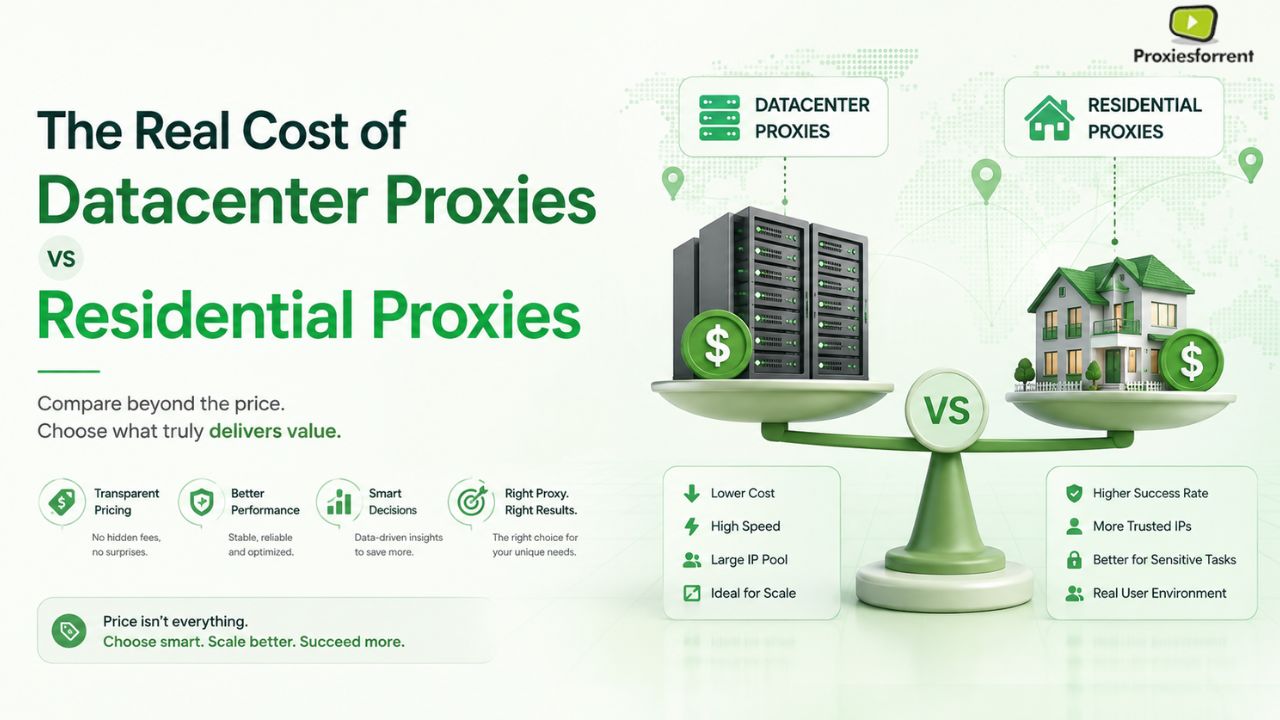
- Datacenter proxies cost $0.50 to $1 per GB, but on protected sites they only succeed 40 to 60% of the time so your real cost per successful request is often higher than it looks.
- Residential proxies cost $2 to $15 per GB, but success rates on protected targets run 95–99%, which usually means less wasted spend, not more.
- Shared proxies are the cheapest option upfront but carry the highest block risk, since you share an IP’s reputation with strangers.
- Speed favors datacenter proxies hard: 10 to 100ms versus 200 to 2000ms for residential.
- The “cheap” proxy is only cheap if your target doesn’t fight back on sites with real anti bot systems, it often costs more per successful data point.
- A hybrid setup datacenter for easy targets, residential for hard ones – usually beats picking one type for everything.
By the End of This Article
You will know what is the difference between datacenter proxies and residential proxies at an infrastructure level, why a $0.50 per GB datacenter proxy might cost you more than an $8 per GB residential proxy doing the same work, and what proxy will be best suited for your particular case.
Most people pick a proxy the way they pick a phone plan: whichever number is smallest. That’s the mistake. The businesses that get burned aren’t the ones who pay too much, they’re the ones who pay too little for something that quietly fails half the time.
If you buy cheap datacenter proxies to scrape or automate against a site with real bot protection, you’re not saving money. You’re paying for requests that get blocked, then paying again in engineering time to work around the blocks, then paying a third time in delayed or missing data. The invoice looks small. The real cost isn’t.
This article breaks down what datacenter proxies, shared proxies, and residential proxies actually cost not just per gigabyte, but per successful result so you can budget on reality instead of a sales page.
The Core Architecture: What You’re Actually Buying
Datacenter Proxies
A datacenter proxy is an IP address that comes from a cloud server or hosting provider, not a home connection. It’s infrastructure, not a person.
- Where it comes from: Cloud hosting companies, issued in large blocks.
- Primary strength: Speed and cost response times of 10–100ms, and pricing that’s often flat rate or per IP rather than per gigabyte.
- Primary weakness: Detectability. Entire blocks of IPs belong to the same hosting provider, so security systems can flag and blacklist a whole range at once.
Think of it like a rented office building: fast, cheap, fine for routine business but if the building has a reputation, everyone inside gets watched more closely.
Residential Proxies
A residential proxy is an IP address issued by a real ISP to an actual home. Traffic routed through one looks like it’s coming from a person’s laptop or phone, because it is.
- Where it comes from: ISPs like Verizon or Comcast, assigned to real household connections.
- Primary strength: Trust. Websites see a residential IP and assume it’s a genuine visitor, which is why residential proxies clear anti-bot checks datacenter IPs fail.
- Primary weakness: Speed and cost. Traffic runs over consumer-grade connections (200–2000ms), and pricing is usually per gigabyte.
This is the difference between renting an office building and borrowing someone’s house key. The house looks legitimate because it is one that’s the entire value proposition, and the entire reason it costs more.
Shared Proxies
Shared proxies are the budget tier within the datacenter category where multiple customers route traffic through the same IP pool instead of getting a dedicated address.
- Where it comes from: Same infrastructure as dedicated datacenter proxies, split across many users.
- Primary strength: Price. Usually the cheapest entry point, sometimes under $1 per GB.
- Primary weakness: You inherit other people’s mistakes. If another customer on your shared pool gets flagged for abuse, your traffic gets flagged too.
Performance Showdown: Speed, Success Rate, and Cost
Speed
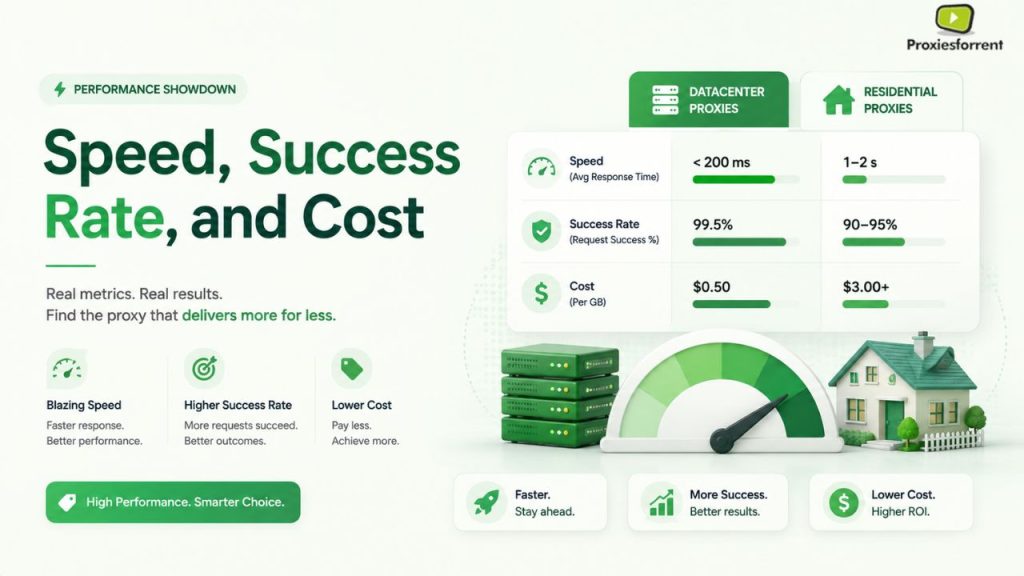
Datacenter proxies win this category without much of a contest. These proxy servers make use of server infrastructure that gives them a high bandwidth with low latency, with requests being processed typically within 10-100 milliseconds. But residential proxy servers depend on consumer devices and networks for responding, which leads to higher latency, as they typically respond within 200-2000 milliseconds.
If raw speed is your only requirement, say, load testing your own infrastructure, or hitting an API with no bot detection datacenter proxies are the obvious picks.
Success Rate on Protected Targets
This is where the story flips. On sites with serious anti-bot systems Cloudflare, Akamai, or custom enterprise bot management the gap is stark:
Datacenter proxies: success rates typically fall to 40–60% on protected targets, sometimes dropping as low as 20–30% on the most aggressively defended sites.
Residential proxies: success rates on the same category of target typically run 95–99%.
Shared datacenter proxies: often perform worse than dedicated datacenter proxies on protected targets, since the IP pool’s reputation gets damaged faster when many unrelated users share it.
On unprotected or lightly protected sites, this gap mostly disappears datacenter proxies can hit 90 to 95% success rates when there’s no real defense system to beat.
The Real Cost Per Success Math
Here’s the part most pricing pages skip. If a datacenter proxy costs $1/GB but only succeeds 50% of the time on your target, your effective cost per successful request roughly doubles you’re paying for the failed attempts too, plus whatever it costs to retry them. A residential proxy at $8/GB with a 98% success rate wastes almost nothing on failures.
Cost Per Gigabyte is Different From Cost Per Result. Stick to the latter.
Efficiency of Spending: What It Truly Takes
There is a difference in pricing approach between datacenter proxies and residential ones, and this explains why direct comparison can be wrong, based on just one cost metric.
- Pricing of datacenter proxies may imply cost per IP, per port, or fixed monthly fees with unlimited/ample bandwidth. Once you’ve paid, additional usage often costs nothing extra which is great, provided your success rate stays high.
- Residential proxies are billed per gigabyte of actual traffic. You pay for what you use, but the per-unit price is higher because you’re paying for the IP’s trust, not just the bandwidth.
- Shared proxies compress the datacenter model even further lower upfront cost, shared risk, and no guarantee of consistent IP reputation over time.
When datacenter proxies are worth it: your target has weak or no bot detection, you need high volume at low cost, and success rate above roughly 85% is realistic for your use case SERP monitoring, internal API testing, price checks on smaller retailers, or general uptime monitoring.
When residential proxies are worth it: your target has real anti-bot infrastructure, and a failed request costs you more than the price difference scraping major e-commerce platforms, managing multiple social accounts without bans, or collecting data from sites that actively fingerprint and block automated traffic.
When to Use Which? A Decision Framework
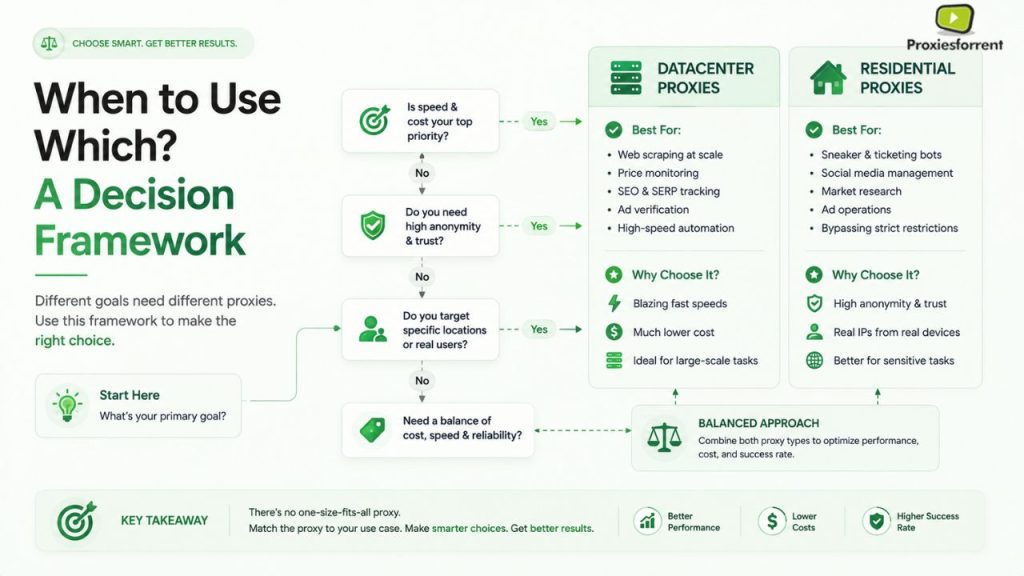
Use datacenter proxies when:
- You’re monitoring search engine rankings or SERP positions at scale.
- You’re running internal load or performance tests against your own systems.
- You’re scraping public data from sites with minimal bot protection – government records, open directories, or basic content sites.
- The budget is tight and the target site’s block rate has historically stayed low.
Use shared proxies when:
- You’re testing a workflow before committing a budget to dedicated infrastructure.
- Your task is low-stakes and occasionally a failed request costs you almost nothing.
- You’re running non-sensitive tasks where IP reputation history doesn’t matter much.
Use residential proxies when:
- You’re scraping large e-commerce platforms like Amazon, Walmart, or major retailers with active anti-bot defenses.
- You’re managing or automating multiple social media accounts and need to avoid mass bans.
- You’re doing ad verification or geo-targeted price checks where the request must look like a real local user.
- You’re collecting high-volume data from travel, ticketing, or booking sites industries known for aggressive scraping defenses.
- A single blocked or failed request has a real business cost attached to it.
The Hybrid Option: Mixing Both by Target
Most experienced teams don’t pick one proxy type and stick with it everywhere. They build a tiered strategy: datacenter proxies for easy, high-volume, low-risk targets, residential proxies reserved for the sites that actually fight back.
This inherits the low cost of datacenter proxies for routine traffic, while borrowing residential reliability exactly where it’s needed. The trade-off is complexity: you need to monitor success rates per target and route traffic accordingly, rather than treating your proxy pool as one size fits all.
For teams running this at scale, proxiesforrent pairs well with the setup dedicated server environments to run and manage proxy rotation logic, rather than juggling both proxy types off a single local machine.
| Comparison Table | Feature | Shared Proxies | Residential Proxies |
| Source/Origin | Cloud hosting providers, dedicated server blocks | Same as datacenter, split across many users | Real ISP connections to actual homes |
| Performance Metric | 10–100ms response time | 10–100ms, but inconsistent under load | 200–2000ms response time |
| Trust/Legitimacy | Low — flagged as non-residential traffic | Lowest — shared reputation risk | High — appears as a genuine user |
| Pricing Model | Flat rate or per-IP, often unlimited bandwidth | Cheapest entry price, per-IP or flat rate | Cheapest entry price, per-IP or flat rate |
| Best Use Case | High volume, low protection targets | Testing, occasional low-stakes tasks | Protected sites, e-commerce, social platforms |
| Detection Risk/Downside | 40–60% success on protected sites | Higher block rate from shared IP abuse | Higher costs, lower speed |
Key Points
- Price per GB is not price per result. A cheap proxy with a low success rate can cost more overall than an expensive one that works.
- Datacenter proxies win on speed and raw cost, but lose badly against real anti-bot systems.
- Residential proxies win on trust and success rate, at the cost of speed and a higher per-GB price.
- Shared proxies carry the most unpredictable risk, since you don’t control who else shares your IP pool.
- The target site decides the right choice, not your budget — match the proxy to the defense level of what you’re scraping.
- A hybrid, tiered setup is how most experienced operations actually run.
FAQs
Are datacenter proxies illegal? No, datacenter proxies are legal to use. Legality depends on how you use them. Scraping public data is generally lower-risk than accessing data behind authentication or violating a site’s terms of service.
Are datacenter proxies good for web scraping? Yes, for targets with weak or no bot protection. On sites with strong anti bot systems, success rates can drop to 40 to 60%, making residential proxies a better fit for those specific targets.
What is the main difference between shared and dedicated proxies? A dedicated proxy is used only by you. Multiple clients use a common proxy on one and the same IP pool, which is less expensive but makes it more likely to be banned because of the actions of another person.
Do residential proxies have a lower chance of getting blocked? Indeed, they do. Since residential IPs are owned by authentic ISPs and are considered real users, their success rate can be 95 to 99%, while that of datacenter proxies is only 40 to 60%.
Can I mix datacenter and residential proxies in one project? Yes, and many teams do. A popular method is to use datacenter proxies for high-volume/low risk, and only use residential proxies if the target site uses bot mitigation services.
Why are residential proxies more expensive than datacenter proxies? You’re paying for trust, not just bandwidth. Real ISP-issued IPs are harder to detect and block, which makes them more valuable for protected targets hence the higher per GB price.
Conclusion
Choosing between datacenter proxies and residential proxies isn’t about which one is “better” it’s about matching the tool to the target. Datacenter proxies give you speed and low cost on easy jobs. Residential proxies give you reliability on hard ones. The budget mistake isn’t picking the cheaper option, it’s picking it for the wrong target and paying for it in failed requests, retries, and lost time.
If you’re running proxy rotation, scraping schedules, or automation workflows at scale, running that on a stable dedicated environment matters. proxiesforrent offers the dedicated server infrastructure that makes a hybrid proxy strategy datacenter for volume, residential for the targets that push back actually manageable.